
Business communications · North West
Yeastar Business Phone Systems
Modern business communications built for voice, messaging, mobile working and connected teams. J700 designs, deploys and supports Yeastar P-Series for businesses that want more flexibility than a traditional PBX.
Trial availability, features and duration are provided by Yeastar and may vary.
- Cloud, software or appliance
- Linkus desktop, mobile and web
- Managed by J700
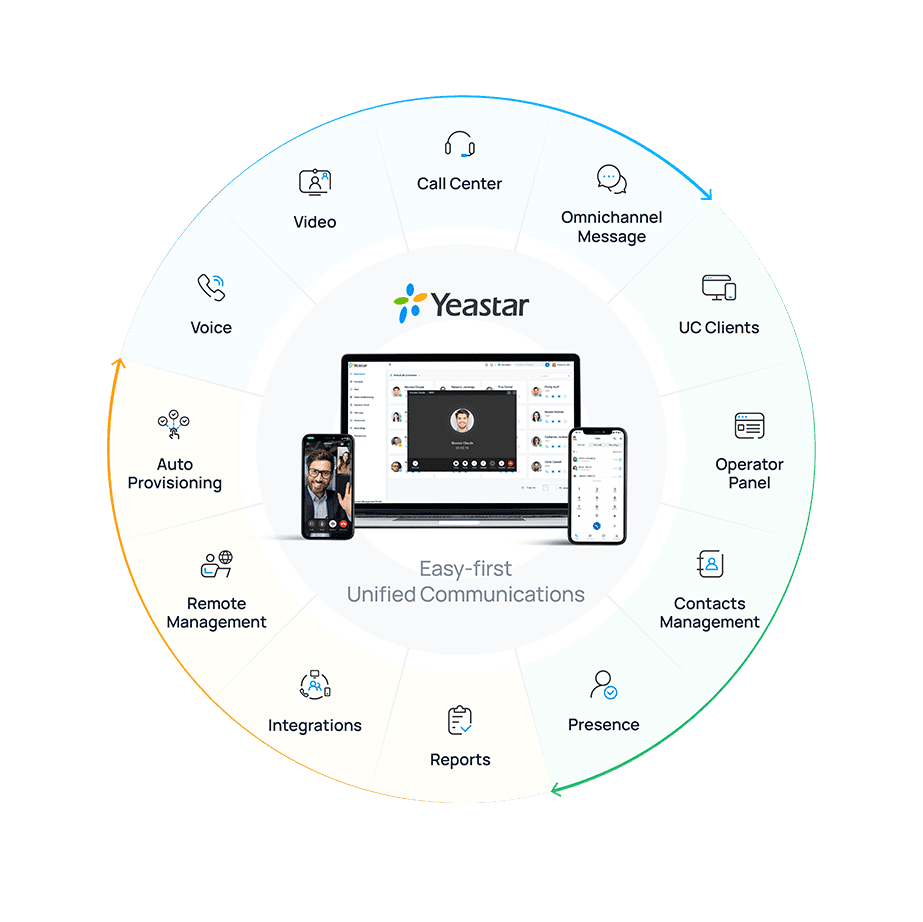
Yeastar is J700's preferred platform for new business communications deployments, chosen around your users, locations and call journeys.
Not every organisation needs every feature, so we recommend a deployment and licence plan that matches the requirement. Already using 3CX? Explore a planned migration, or find support for your current system. There is no requirement to change.
What the platform can do
Communications built around your team, not the other way round.
Business calling
One calling environment for desk phones and supported desktop, mobile and web clients. Your team answers wherever they are working, on the business identity customers recognise.
Call routing
Design IVRs, ring groups, business hours and queues around the way customers reach your team.
Hybrid & multi-site
Connect office-based and remote users across locations without building separate phone estates.
Microsoft Teams
Bring Teams users alongside Yeastar calling on supported P-Series deployments; requirements vary.
CRM & helpdesk
Explore supported integrations, click-to-call and contact context where your workflows benefit.
Contact centre
Queues, agent tools, wallboards and reporting are available on suitable editions and configurations.
Customer messaging
Bring more customer conversations into one environment with supported SMS, WhatsApp, Facebook messaging and live chat channels.
Managed support
J700 can manage the system alongside the network, SIP connectivity and the IT your people depend on.
Capability depends on deployment, edition, licence, channel provider and configuration. J700 will confirm availability and any third-party requirements during design; these channels and integrations are not assumed to be included by default.
Work from anywhere
Linkus keeps your business number with you.
Yeastar's Linkus clients bring business calling to desktop, mobile and web. Supported capabilities include transfers, presence, contacts and call history, with messaging and conferencing available where configured and supported.
A working day without a single desk
- 1
At the office
Answer calls from a provisioned handset or desktop client.
- 2
Between sites
Use the mobile client to stay reachable on your business identity.
- 3
At a shared computer
Use the web client where your configuration supports it.
Yeastar P-Series
Cloud, software or appliance: a choice driven by your environment
J700 reviews your connectivity, control requirements, locations and operating model before recommending an option. Availability and functionality differ depending on deployment and licence plan.
- Cloud
- A hosted approach for organisations that want to avoid managing a PBX server on site.
- Software
- A software deployment where the business has a suitable hosting environment and management requirements.
- Appliance
- A dedicated on-site option when local infrastructure is the better fit.
Connected working
Calling is more useful when it connects to the rest of your business.
Teams integration is available on supported P-Series deployments, allowing Teams users to work alongside Yeastar calling. Requirements vary by deployment method, Microsoft 365 plan and Yeastar edition. Explore Microsoft 365 support.
Supported CRM and helpdesk integrations can put contact context closer to the call. We assess whether click-to-call, contact matching, call pop-ups or an API-led workflow suits your systems. Explore connected workflows.
For service teams, supported plans can add queue panels, wallboards, reporting, callbacks and messaging channels. We establish what your team needs before specifying contact-centre functionality. Discuss your requirements.
J700 is the one team behind it
A phone system is only as dependable as the environment around it.
J700 can design call flows, configure users and phones, set up SIP trunks, coordinate number porting and support the resulting service, alongside the business connectivity, network, security and managed IT that calls depend on.
Yeastar Central Management gives J700 central visibility and management across supported customer systems, allowing us to provision, monitor and support environments more efficiently. Scope and monitoring arrangements are agreed for each service.
How J700 works
From first conversation to ongoing support
- 1
Understand
Map people, locations, call volumes, existing numbers and the customer journeys that matter.
- 2
Design
Choose a suitable P-Series deployment and check feature, integration and licence requirements.
- 3
Deploy
Configure users, trunks, call flows, handsets and Linkus clients; coordinate number porting where needed.
- 4
Support
Test calling and routing with your team, then manage changes and ongoing support as your business evolves.
Try Yeastar
Try Yeastar P-Series for Yourself
Want to explore Yeastar before making a decision? You can apply for a free Yeastar P-Series trial and experience the platform first-hand.
Your trial can then be linked with J700 so we can help you assess the platform, plan your configuration and discuss migration or deployment requirements.
Trial availability, features and duration are provided by Yeastar and may vary.
Already using 3CX?
Moving from 3CX to Yeastar doesn't have to mean starting again.
Yeastar provides an official migration path for supported 3CX V18 and V20 environments. Depending on the existing configuration, supported users, contacts, routing, trunks, queues and other PBX settings may be migrated. We assess what can transfer automatically and what needs rebuilding or review before any cutover.
Practical answers
Frequently asked questions
What is Yeastar P-Series?
P-Series is Yeastar's business PBX family. It offers cloud, software and appliance deployment options, subject to availability and suitability. Features vary by deployment and licence plan.
Can we use our existing numbers and phones?
Number retention depends on your current provider and porting arrangements. Existing SIP handsets may be reusable depending on make, model, firmware and provisioning support; we check both during discovery.
Does Yeastar work with Microsoft Teams?
Microsoft Teams integration is available on supported Yeastar P-Series deployments. Requirements vary by deployment method, Microsoft 365 plan and Yeastar edition; we verify them before proposing a configuration.
Can Yeastar replace an existing 3CX system?
It may be a good option. Yeastar provides an official migration path for supported 3CX environments, but we assess what can be transferred and what needs rebuilding before planning a change.
Can J700 look after the system after installation?
Yes. J700 can support the phone system together with the underlying SIP connectivity, network and wider IT environment, subject to the agreed service scope.
Let's make business calling work better.
Tell us about your current phones, teams and customer conversations. We'll help you identify a practical next step, without assuming a particular setup.